What Can Your AI Chatbot Teach You About Your Customers?
Your AI chatbot hears what customers want, in their own words. How idea capture turns chats into customer insights — without drowning you in noise.
From the AnswerRails development blog — plain-English notes on the technology behind trustworthy AI chat.
If there’s an AI assistant on your website, your customers are already telling you what they want. “Do you do gift wrapping?” “Can I hire one instead of buying?” Every question is a small vote. The hard part isn’t collecting these. It’s teaching the system what not to write down.
Our first version wrote down too much
We built a capture pipeline: while the assistant answers, it watches for suggestions and requests and files them in an ideas list in the WordPress dashboard.
In a test of twelve conversations, it recorded ideas in eight of them. One was pure flattery (“love what you do!”). One was a single word — a surname typed into the box. One routine product lookup produced five ideas on its own.
Nothing malfunctioned. The instructions were just too eager. And if two-thirds of conversations produce a note, the ideas list becomes a second inbox, and you stop reading it.
A dial, not a hope
The fix was a sensitivity dial: Chatty, Normal and Minimal, plus off. We built it two ways at once. Better instructions make the AI choosier, and a check in ordinary program code enforces a hard limit on what gets stored, whatever the AI does. A guardrail is a check, not a hope.
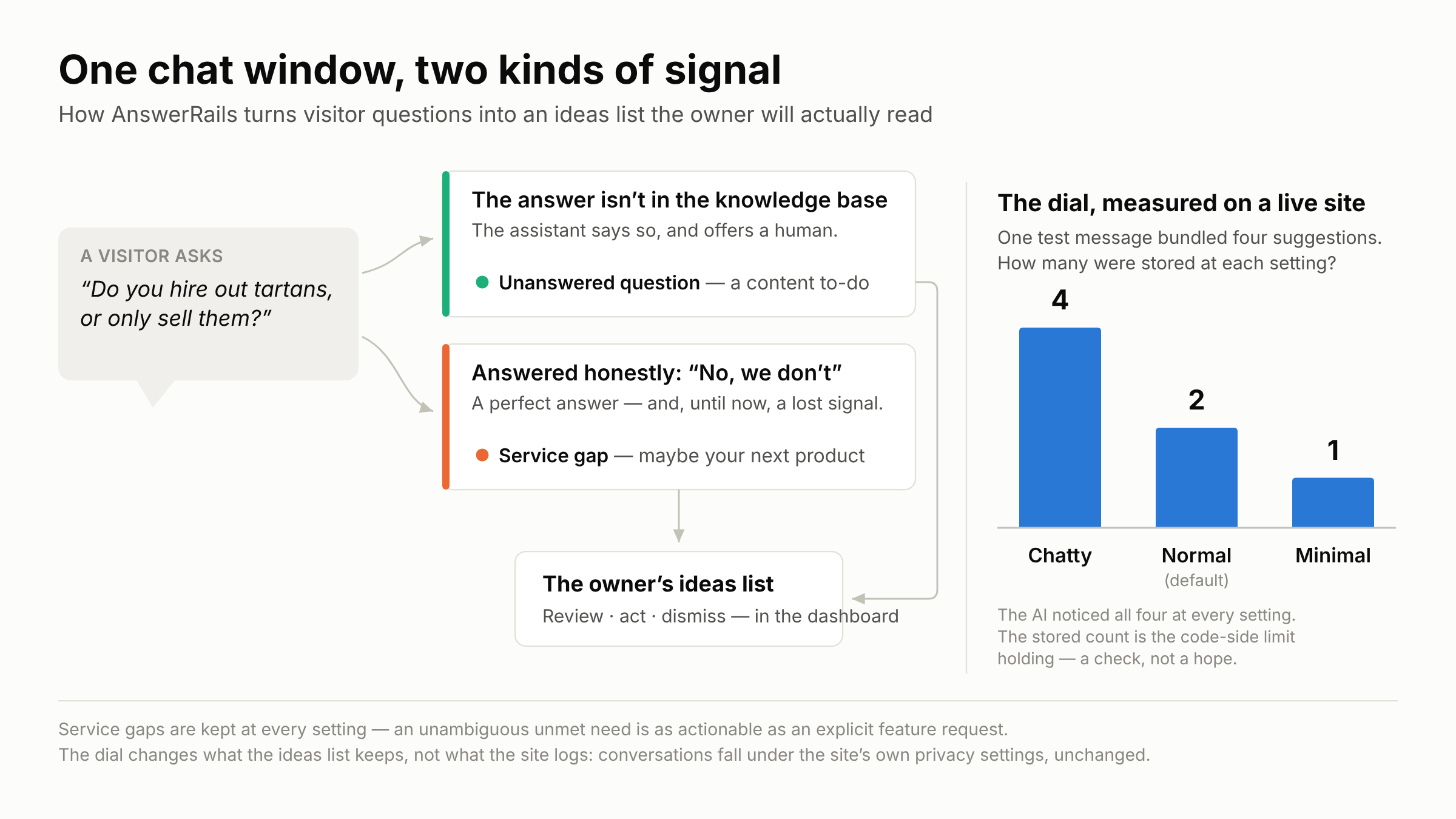
Then we measured it. One test message bundled four suggestions into one breath. The AI spotted all four every time; what got stored was four on Chatty, two on Normal, one on Minimal. Exactly the configured limits. On the default setting, the capture rate fell from eight-in-twelve to one-in-six.
The signal we weren’t recording
The best catch came from a design review question: are we missing gaps in the service itself?
The assistant already logs every question it can’t answer — those are gaps in your knowledge base. But suppose a visitor asks “do you hire out tartans, or only sell them?” and the assistant correctly answers no, sales only. Nothing failed, so nothing was recorded. That visitor just told the business about demand for a hire service, and the demand went nowhere. The better the assistant got at saying “we don’t offer that”, the more of this signal drained away.
So we added a category: the service gap. It’s recorded at every sensitivity level, because an unmet need is as actionable as a feature request. Unanswered questions are a to-do list for your content. Service gaps might be your next product.
One honest limit: spotting a service gap relies on the AI’s judgement, and in our tests it offered a note on about one such answer in four. A guaranteed catch is designed, not yet built.
Three questions for any vendor
What stops it recording noise — a limit you control, or good intentions? When the assistant correctly answers “we don’t do that”, is the demand recorded anywhere? And can you turn capture down, or off, without turning the assistant off?
A chat window is a suggestion box people actually use. It deserves a note-taker with limits that don’t depend on judgement.
AnswerRails is a WordPress plugin bringing safe, grounded AI chat to small-business websites. More at answerrails.com.