Where Does Your AI Chat Data Go? (And Who Can See It?)
Where does your website chatbot’s data go? Chat logs, AI providers, consent and deletion in plain English — plus the middleman question to ask any vendor.
From the AnswerRails development blog — plain-English explanations of the technology behind trustworthy AI chat.
At ten past eleven on a Tuesday night, a visitor opens the chat on your website and types: “My order hasn’t arrived and I go away on Friday — can you help?” A small, ordinary moment. Also personal data. That one sentence says this person has bought from you, hints at their travel plans, and — the moment they add a name or an order number — identifies them outright.
So: where did it go?
If you run an AI assistant on your website, that question deserves a precise answer, because you are the one who will be asked it — by a careful customer, by your own privacy policy, or, if you trade in the UK or Europe, by data-protection law. Last week we looked at whose bill your website’s AI is on; this week is the companion question we promised: whose data is it, who can see it, and what an honest answer looks like. We will follow one chat message from the moment it is typed to the moment, months later, it is deleted.
Three parties who could hold a copy
When a visitor chats with an AI assistant, up to three parties could end up holding their words.
The first is your own website. Somebody usually keeps a transcript — for support follow-ups, for spotting what customers keep asking, for checking the assistant behaved itself.
The second is the AI provider — the company whose model actually writes the answers. The provider has to see the question, or it cannot answer it. That is not a leak; it is how the technology works. What matters is which provider, and under whose agreement.
The third — and this is the one many owners never learn about — is a middleman platform. Plenty of hosted chat products route every conversation through the vendor’s own cloud: the visitor talks to your website, your website talks to the vendor’s platform, and the vendor’s platform talks to an AI provider the vendor chose. The transcripts sit in the vendor’s infrastructure, under the vendor’s terms, and the only way you can describe your own data chain to a customer is by quoting somebody else’s privacy policy.
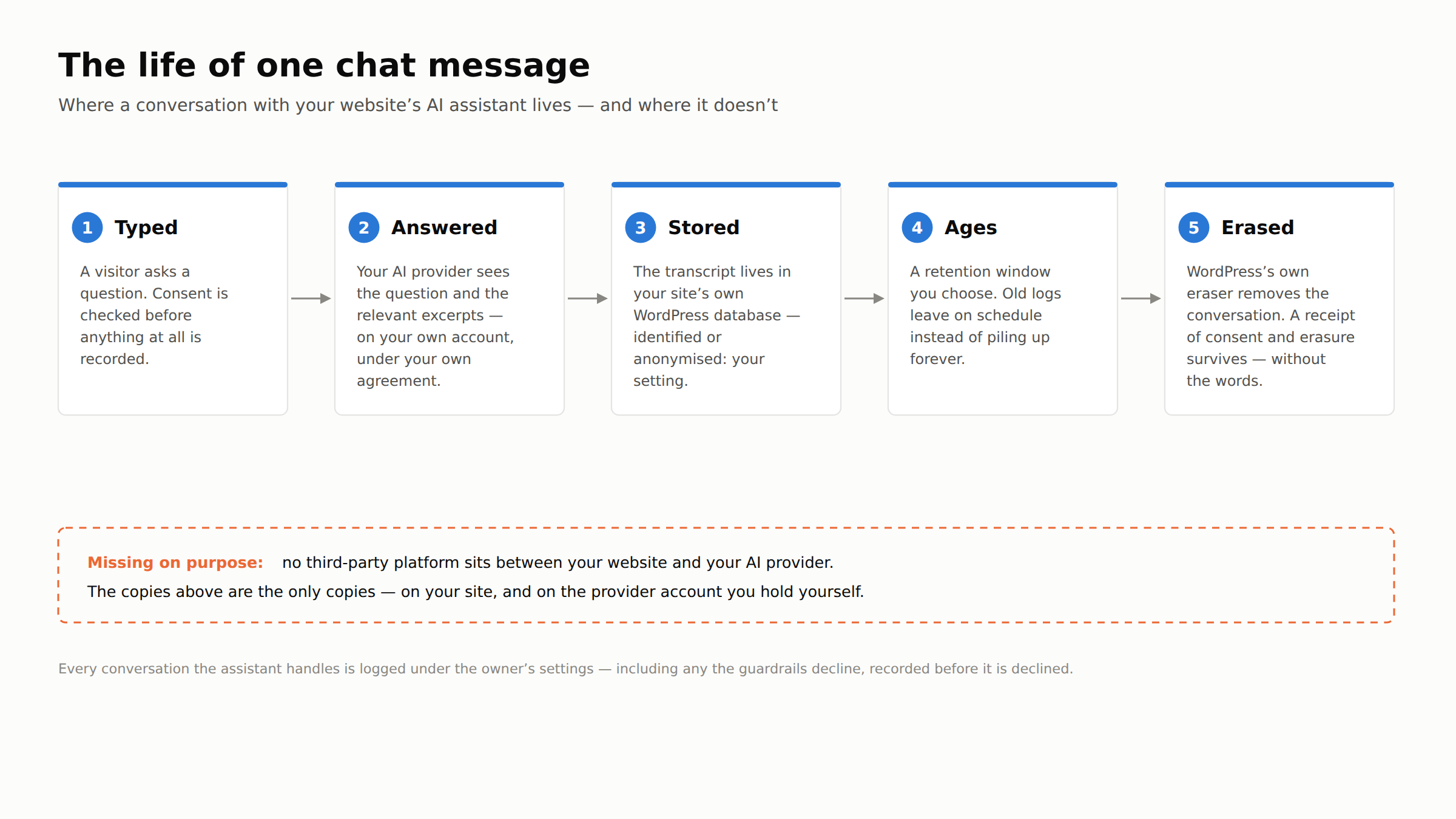
We built AnswerRails without that third party. Chat logs are stored in your site’s own WordPress database, on your own hosting, alongside your orders and your comments. Your knowledge base syncs to your own AI-provider account — you bring your own key — and each question travels directly from your site to your provider. Two parties: you, and the provider you signed up with yourself. When a customer asks where their chat went, the answer fits in one sentence.
What actually gets written down
“We keep transcripts” sounds like a single fact. It is really four decisions, and an honest product makes each of them yours.
Whether to log at all. Chat logging in AnswerRails is a setting, not a fact of life. Some owners want a full record; some want none.
Identified or anonymised. A transcript is useful for improving your knowledge base even with the personal details stripped. AnswerRails can log conversations anonymised, keeping what was asked without keeping who asked it.
Consent first. If your site asks visitors for consent before storing their data — most European sites do — the assistant has to respect a refusal, not merely display the banner. A conversation that should not be recorded, isn’t.
For how long. Data you no longer need is risk you no longer need to carry. You choose a retention window, and old logs leave on schedule instead of accumulating forever.
None of these decisions is exotic — they are the same ones you already make about analytics and cookies. What makes chat different is the content. People tell a chat things no analytics script would ever capture: names, addresses, complaints, circumstances. Which is why the last stretch of our message’s journey matters most.
Deleting a conversation properly
WordPress has had personal-data machinery built into its core since 2018. Under Tools, every WordPress site has Export Personal Data and Erase Personal Data — the tooling that lets a site owner answer “send me what you hold about me” and “delete it” with actions rather than promises. A chat plugin that stores transcripts should plug into that machinery, so that when the eraser runs, chat data is included — not sitting beside it in a separate pile the eraser cannot see.
Earlier this month we put our own integration through a full rehearsal on our development site: a real conversation through the real chat widget, a real erasure request against that visitor’s email address, and WordPress’s own eraser doing the work. The rehearsal did exactly what rehearsals are for — it surfaced rough edges you only find by doing the real thing, and the improvements it produced are in a coming release. That is the right order to do it in. The moment a real “delete my data” request arrives is a terrible time to discover what your eraser leaves behind.
The receipt problem
Deletion has a wrinkle that catches products out. Suppose a visitor consents to their chats being recorded, later withdraws that consent, and later still asks whether you ever had permission in the first place. If deleting the conversation also deleted every trace of the consent, you now cannot show that you ever behaved correctly.
The answer is receipts: keep a record of the events — consent given on this date, withdrawn on that one, erasure completed — without keeping the words. When we designed consent withdrawal for AnswerRails, this was the principle: the record of a conversation’s lifecycle survives; its content does not have to. Regular readers will recognise the house style — a guardrail is a check, not a hope — and it applies to privacy promises too. “We deleted it” should be a receipt you can show, not a hope you can express.
Three questions for any vendor
- Where exactly are chat transcripts stored, and who can read them? If the answer includes the vendor’s own cloud, there is a middleman in your data chain. That may be acceptable — but it belongs in your privacy policy, and you should know its name.
- What happens when a visitor asks me to delete their conversation? On a WordPress site, look for integration with WordPress’s own privacy tools — a deletion you run and verify yourself, not a support ticket and a promise.
- Can I prove consent was given — and withdrawn — without keeping the conversation itself? If deleting the words also deletes the evidence, the product has swapped one compliance problem for another.
Privacy work is almost invisible. It never shows up in a demo, and nobody ever bought a chatbot because its eraser was well rehearsed. But it is precisely where a public-facing AI assistant — one that talks to strangers, in your name, on your website — earns or loses the right to be trusted. In the coming weeks: what your assistant’s unanswered questions can teach you about your own business, and how we test an AI by deliberately trying to break it.
AnswerRails is a WordPress plugin that adds a compliance-first, public-facing AI assistant to your website — with guardrails, citations, and honest reporting built in. Learn more at answerrails.com.