Keyword vs Semantic Search: Which Does Your Chatbot Need?
Keyword search vs semantic search, in plain English: how each finds answers in your knowledge base, and when the simple one is honestly enough.
From the AnswerRails development blog — plain-English explanations of the technology behind trustworthy AI chat.
If you have looked into adding an AI assistant to your website, you may have run into the phrase keyword search vs semantic search — usually wrapped in enough jargon to make both sound like magic. They are not magic. They are two different ways of finding the right page of your own knowledge before the AI opens its mouth, and understanding the difference will tell you a lot about what you actually need — and what you should expect to pay for.
We build a public-facing AI assistant for WordPress, and it ships with both. So this week: what each one really does, when the simple one is honestly enough, and three slightly embarrassing things we learned building ours.
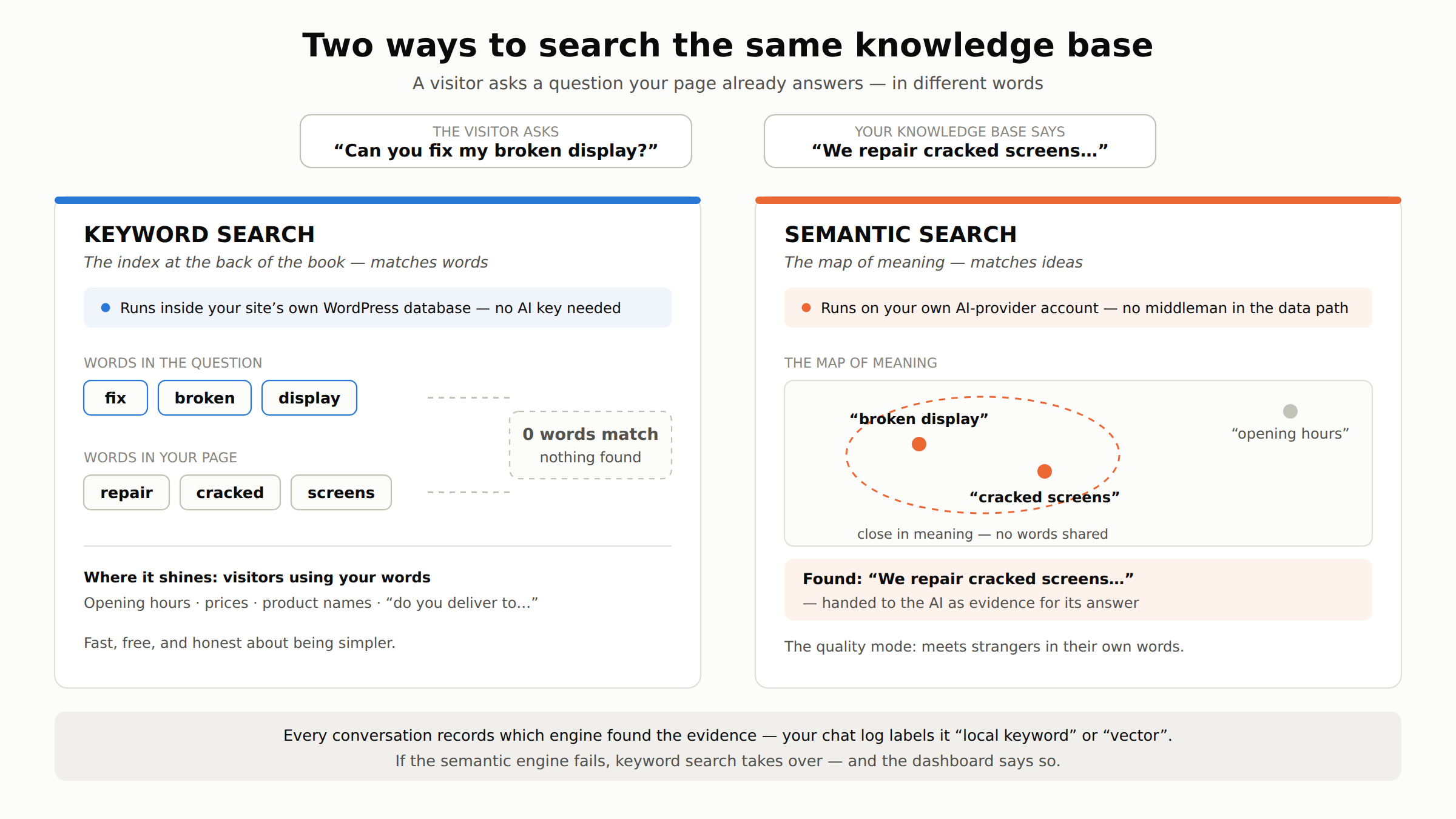
The index at the back of the book
Keyword search is the one you already know. It works like the index at the back of a book: you look up the exact word, and it tells you which pages contain it. Ask “what are your opening hours?” and a keyword search hunts through your knowledge base for entries containing opening and hours, ranks the matches, and hands the best ones to the AI as evidence.
Its great virtues are that it is fast, it is cheap, and it runs entirely inside your own website’s database. No account with an AI provider is needed for the searching half at all. In AnswerRails, local keyword mode is exactly that: your knowledge is stored and searched in your site’s own WordPress database, and only the excerpts relevant to a question are passed to your AI provider when it is time to write the answer. In this mode, even “syncing” your knowledge never leaves the building — preparing the content for search happens on your own server.
Its great weakness is that it only knows words, not meanings. If your page says “we repair cracked screens” and the visitor asks “can you fix my broken display?”, a pure keyword search finds nothing. Not one important word matches. The index at the back of a book is no help if you don’t know which word the author used.
The map of meaning
Semantic search — the vector search we covered in our first post — solves precisely that problem. Instead of matching words, it places every passage of your knowledge on a kind of map of meaning, and finds the passages that sit near the visitor’s question — even when they share no vocabulary. “Fix my broken display” and “we repair cracked screens” land close together on that map, because they mean nearly the same thing.
That is why semantic search is the quality mode. Strangers do not read your website before asking questions; they use their own words, and semantic search meets them there.
It comes with an honest cost, though. Building the map means processing your knowledge through an AI provider, and in AnswerRails that happens on your own provider account — the same account that powers your assistant’s answers. There is no third-party platform of ours sitting in the middle of that relationship: your knowledge syncs directly between your site and the provider you hold the account with, and the bill for it is between you and them. We think that is the right shape, but it does mean the quality mode needs a provider account and the simple mode doesn’t.
When is simple honestly enough?
More often than the sales pages admit. Keyword search does well when the visitor’s words and your words are likely to be the same ones: opening hours, prices, product names, addresses, “do you deliver to…”. A small knowledge base about a specific business has a lot of questions like that.
It struggles when visitors paraphrase — and strangers paraphrase constantly. Our rule of thumb: keyword search is a fine way to start, and a fine permanent choice for a compact, well-labelled knowledge base (which has other virtues too). Semantic search is what you upgrade to when you watch real conversations and see good questions going unanswered because they were phrased differently from your pages.
Which means the feature that matters most is not either engine — it’s being able to see which engine found the evidence for each answer. Every AnswerRails conversation records its retrieval source, and the chat log labels it plainly (“local keyword” or vector), so “should I upgrade?” is a question you answer from your own traffic, not from a brochure.
Three things we learned building both
The health check that tested nothing. Our dashboard runs a self-test on the search system so you can see it is working. The obvious way to test a search engine is to search for a fixed test phrase — and that is what we tried first. The score came back zero. Every time. Of course it did: the test phrase wasn’t in anyone’s knowledge base, and a search engine that finds nothing when there is nothing to find is working perfectly. The test was testing nothing. Now the self-test borrows one of your own knowledge items’ titles and searches for that — something that genuinely should be found. Lesson: an honest health check has to ask a question it deserves an answer to.
The one-item quirk. Keyword search ranks matches by how distinctive the matching words are. If your knowledge base contains exactly one document, that document’s title words appear in every searchable chunk of it — so they stop being distinctive, and the relevance scores hover near zero even when the match is right. The results are still correct; the confidence numbers just look oddly humble until the knowledge base grows. We could have quietly inflated the scores. We documented the quirk instead. Different-but-honest beats polished-but-misleading, in scores as much as in answers.
The fallback that knows the difference between “broken” and “empty”. Semantic search depends on a service beyond your server, and services have bad days — readers of our first post will remember the July outage that shaped this design. When the semantic engine actually fails, AnswerRails falls back to the local keyword index, records the incident, and the dashboard says so honestly. But when the semantic engine works fine and simply finds nothing relevant, there is no fallback — because “your knowledge base doesn’t cover this” is a true answer, and a second engine second-guessing it is how chatbots end up padding replies with weak evidence. A fallback is for failure, not for answers you’d prefer were different.
Three questions to ask any vendor
- Can it search my knowledge without an AI provider key at all — and what, exactly, does that simpler mode do? “Yes, honestly-labelled keyword search” is a fine answer. Vagueness is not.
- When the smarter search fails, what happens? You want a fallback and a dashboard that admits the fallback is running — not a system that pretends nothing happened.
- For any single conversation, can you show me which search engine found the evidence? If the answer is no, “should I pay for the better mode?” becomes a question you can never answer with data.
Two engines, one honest question between them: do your visitors use your words, or their own? Next week we’ll look at the other half of the “your own provider account” story — bring your own key, and why we deliberately don’t sit between you and your AI bill.
AnswerRails is a WordPress plugin that adds a compliance-first, public-facing AI assistant to your website — with guardrails, citations, and honest reporting built in. Learn more at answerrails.com.