What Makes a Good AI Knowledge Base? (It Has Two Readers)
What makes a good AI knowledge base? Field lessons: write for two readers, give titles that travel, and let unanswered questions show you the gaps.
From the AnswerRails development blog — plain-English explanations of the technology behind trustworthy AI chat.
If you’ve given your website an AI assistant, the knowledge base is the part you actually control. The model comes from a provider and the guardrails come from your plugin, but the knowledge — the pages, documents and FAQs the assistant answers from — is yours to write and yours to tend. In an earlier post we compared grounded AI to an open-book exam: the assistant answers with your book open in front of it. This post is about the book. After months of feeding one — on our long-running demo shop, and in test batteries designed to break things — here is what we’ve learned about what makes an AI knowledge base good. Less of it is about volume than you might think.
The entry the AI refused to read
Our demo shop sells Scottish clan crests, and its knowledge base includes a cross-reference table mapping family names to the clans they’re associated with — written the way you’d write it for a machine:
Hardy -> Campbell or Ferguson
Laurie -> MacLaren or Gordon
Reid -> Gunn
Tidy, compact, unambiguous — to a parser. Then one day in testing we asked which clan the name Laurie belongs to. The search step did its job perfectly: it found that exact line and handed it to the AI. And the AI replied: “I don’t have that information to hand.”
That looks like a malfunction. It was actually a safeguard doing its job. What the AI received was a fragment of bare arrow-lines with no explanation of what an arrow means. Its standing rules say: never assert a meaning you can’t back with the material in front of you. Faced with notation nobody had taught it, it declined — honestly — rather than guess.
The fix wasn’t a bigger model or more data. It was one sentence of framing — the kind of line you’d write for a new colleague: each line links a family name to the clan or clans it’s associated with. Ask the same question with that sentence in place and you get the correct answer, drawn straight from the entry. (AnswerRails now supplies that framing automatically when an owner marks a table as a cross-reference — but the lesson generalises well beyond our plugin.)
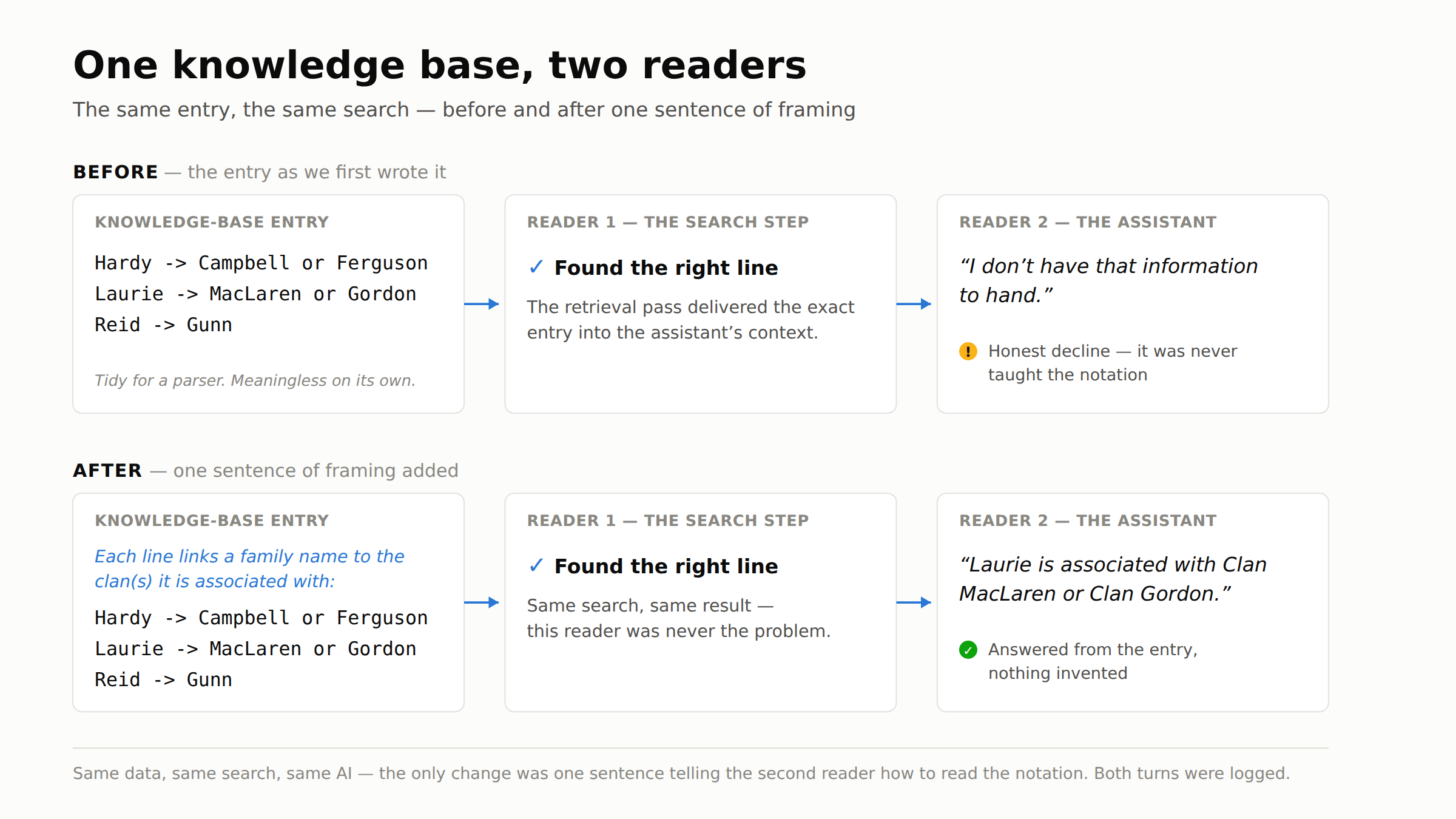
The lesson we banked that day: your knowledge base has two readers. The search machinery, which is very good at finding fragments, and the AI, which has to interpret them. We had optimised for the parser and forgotten the other reader. If you put anything shorthand into a knowledge base — codes, abbreviations, spreadsheet columns, arrows — add the sentence that says what the shorthand means. One of your readers genuinely needs it.
Titles travel further than you think
Long documents don’t reach the AI whole. Behind the scenes they’re split into fragments — the trade calls them chunks — of a few hundred words each, because search works on pieces, not tomes. A fragment from the middle of page three has a problem, though: on its own, it no longer knows what document it came from.
Our answer is to stamp every fragment with the title of the item it belongs to, so each piece travels with its label. Which quietly turns the title field into one of the most load-bearing things you write. “Returns and refunds policy” tells both readers exactly what every fragment of that document is about. “Final doc v2 (updated)” tells them nothing at all.
Name your knowledge-base items the way you’d label boxes for a house move: as if the person unpacking has never seen the contents. Because one of them hasn’t.
The gap your visitors will find for you
Here’s the finding that surprised us most. In two separate rounds of structured testing on the demo shop — dozens of questions, deliberately varied — every single question the assistant had to hand off to a human was about shipping or pricing. Not one was about the shop’s actual subject. The knowledge base was deep on clan heritage — septs, tartans, crests — and silent on “how much is delivery?”
That’s a very normal failure. You write about what you know and love; your visitors ask about postage. Two things follow from it.
First, the cheapest high-value addition to most knowledge bases isn’t more depth on the subject you’re expert in — it’s a plain FAQ covering the unglamorous questions: shipping, returns, pricing, opening hours. When our test batteries flagged the gap, the single most valuable fix they identified wasn’t more clan data. It was a shipping and returns page.
Second, choose an assistant that keeps a record of the questions it couldn’t answer. Every hand-off and every “I don’t know” is a visitor telling you — precisely, and for free — what your knowledge base is missing. That list is your curation to-do list, ranked by the best signal there is: real people actually asked.
It will be repeated back to you — so keep it honest
An assistant that answers from your knowledge base is faithful to it, and that faithfulness cuts both ways. In one test round we were puzzled that the assistant kept associating certain family names with unexpected clans — until we opened the knowledge base and found those exact rows sitting in the cross-reference table. The assistant wasn’t inventing anything; it was accurately quoting entries we’d forgotten writing. Whether a row should say what it says is the owner’s call — but only the owner can make it, and only if they look.
The reverse happened too. During a full road-test on another site, one answer flatly contradicted a page on the site itself, and we initially graded it a failure. Then the owner looked — and ruled the assistant right. The page was stale; the knowledge base was current. When the two disagree, the site is not automatically the ground truth. The owner is.
So audit yours the obvious way: ask your own assistant questions and read what comes back, with the sources open beside the answers. Ten minutes of that teaches you more about your knowledge base than any dashboard.
What a good one looks like
Picture a small roofing firm. Its services, areas-covered and contact pages come in as site content. The written guarantee — the document customers actually ask about — is uploaded as a file. Opening hours and a short FAQ go in as structured entries. The firm’s trade-body registration is added as an external link. Now walk through the five questions a caller actually asks: are you certified, what does the guarantee cover, do you work in my area, roughly what will it cost, when can I ring you? Each one lands on an item the owner can point to, in words the owner wrote.
That’s perhaps thirty items. It isn’t big, and it doesn’t need to be. Coverage of the questions people really ask beats bulk, every time.
Three questions to ask any vendor
If you’re evaluating an AI assistant for your site, ask any vendor — ours included:
- Does it record the questions the assistant couldn’t answer, and show you them in one place? That log is where your knowledge base grows from.
- Can you see which knowledge items a given answer actually drew on? If you can’t trace an answer to its source, you can’t fix the entry behind a bad one.
- When the knowledge base is silent on a topic, does the assistant say so — or does it fill the silence? An honest “I don’t know” is a feature you should insist on.
A good knowledge base, it turns out, is less like a library and more like a well-kept shop counter: labelled clearly, stocked with what people actually ask for, and checked by the person who owns it. Next in this series: the two ways an assistant can search your knowledge — by keyword and by meaning — and how to tell which one you need.
AnswerRails is a public-facing AI assistant for WordPress — it answers your visitors from your own content, with guardrails wired in rather than hoped for. You can follow the series, and the product, at answerrails.com.